圣诞节也在绝赞折腾博客喵~
Busy improving my blog even on Christmas!
Preview
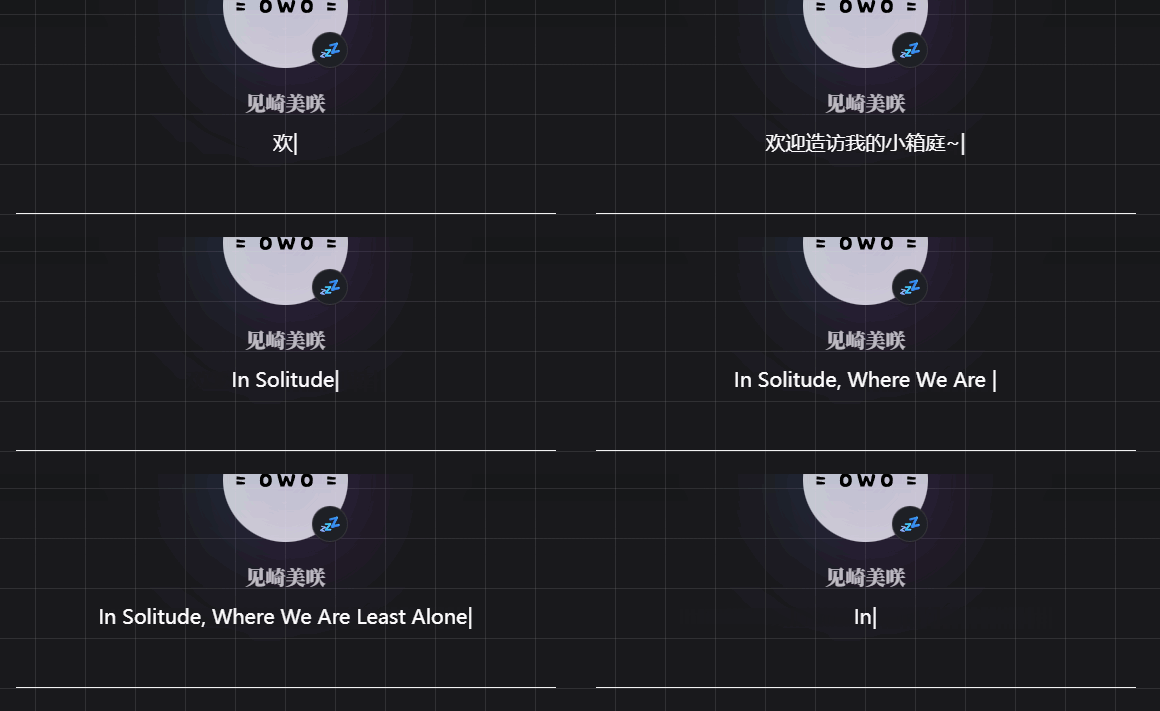
基于yun主题原组件YunPrologueSqure,进行修改后实现的介绍打字效果
This is modified based on the original component YunPrologueSqure from valaxy-theme-yun, designed to implement a typing effect for introductions.
js
ts
// 设置显示语句、逐字出现和删除的时间间隔、显示完一句话后的停顿时间
const intro = ['欢迎造访我的小箱庭~', 'In Solitude, Where We Are Least Alone'],
  dynamicIntro = ref(''),
  typingSpeed = 150,
  deletingSpeed = 50,
  pauseTime = 900

// 初始化
let introIndex = 0,
  charIndex = 0,
  isDeleting = false

// 打字机效果实现
function typingEffect() {
  const currentIntro = intro[introIndex]

  // 如果当前不是删除状态
  if (!isDeleting) {
    // 逐个增加字符,并递增字符索引
    dynamicIntro.value = currentIntro.substring(0, charIndex + 1)
    charIndex++

    // 如果一句已经全部显示,则切换为删除状态,并等待900ms
    if (charIndex == currentIntro.length) {
      setTimeout(() => {
        isDeleting = true
        typingEffect()
      }, pauseTime)
      return
    }
  } else {
    // 如果当前为删除状态,逐个减少字符,并递减字符索引
    dynamicIntro.value = currentIntro.substring(0, charIndex + 1)
    charIndex--

    // 如果一句已全部删除,则切换为非删除状态,并将intro索引切换到下一句
    if (charIndex == 0) {
      isDeleting = false
      introIndex = (introIndex + 1) % intro.length
    }
  }

  // 根据当前状态决定下次执行的间隔时间
  setTimeout(typingEffect, isDeleting ? deletingSpeed : typingSpeed)
}

// 页面加载完成后,等待1.3秒再开始打字机效果
onMounted(() => {
  setTimeout(() => {
    typingEffect()
  }, 1300)
})
ts
// Set intro and typing, deleting, waiting time
const intro = ['欢迎造访我的小箱庭~', 'In Solitude, Where We Are Least Alone'],
  dynamicIntro = ref(''),
  typingSpeed = 150,
  deletingSpeed = 50,
  pauseTime = 900

// initialization
let introIndex = 0,
  charIndex = 0,
  isDeleting = false

// typewriter animation implementation
function typingEffect() {
  const currentIntro = intro[introIndex]

  if (!isDeleting) {
    // gradually display the text character by character
    dynamicIntro.value = currentIntro.substring(0, charIndex + 1)
    charIndex++

    // if the full text is dislayed, switch to deleting mode and wait for 900ms
    if (charIndex == currentIntro.length) {
      setTimeout(() => {
        isDeleting = true
        typingEffect()
      }, pauseTime)
      return
    }
  } else {
    // if currently is deleting mode, gradually delete the character
    dynamicIntro.value = currentIntro.substring(0, charIndex + 1)
    charIndex--

    // when all charaters are deleted, switch back to typing mode and move to the next sentence
    if (charIndex == 0) {
      isDeleting = false
      introIndex = (introIndex + 1) % intro.length
    }
  }

  // determine the interval for the next execution based on the current mode
  setTimeout(typingEffect, isDeleting ? deletingSpeed : typingSpeed)
}

// start the typing effect after 1.3s when the page is mounted
onMounted(() => {
  setTimeout(() => {
    typingEffect()
  }, 1300)
})
css
主要是通过css实现光标效果,本身样式基于yun主题
css
/* 在文字后添加闪烁光标 */
.site-author-intro::after {
  content: '|';
  animation: blink 1s infinite;
}

/* 闪烁动画 */
@keyframes blink {
  0%, 100% {
    opacity: 1;
  }
  50% {
    opacity: 0;
  }
}
Using CSS to achieve cursor blinking effect, and the style itself is from Yun theme.
css
/* add blinking cursor after the text */
.site-author-intro::after {
  content: '|';
  animation: blink 1s infinite;
}

/* blinking animation */
@keyframes blink {
  0%, 100% {
    opacity: 1;
  }
  50% {
    opacity: 0;
  }
}
HTML / Vue Template
效果展示
vue
<div class="site-author-intro" m="t-0 b-4">
  {{ dynamicIntro }}
</div>
displaying the effect
vue
<div class="site-author-intro" m="t-0 b-4">
  {{ dynamicIntro }}
</div>